
Click on one of these buttons to get the assistance you need

Eco 3™ Manual
Download the full user guide for the FoodCycler® Eco 3™.

Eco 5™ Manual
Download the full user guide for the FoodCycler Eco 5™.

FC-30 / FC-50 Manual
Download the full user guide for the FoodCycler FC-30 / FC-50.
Using Your Bucket
Tips for loading, balancing, and caring for the bucket that does the heavy lifting.
What can I put in my FoodCycler®?
Most food scraps and leftovers are fair game — fruit and veggie scraps, grains, eggshells, bones, pits, coffee grounds, and more. For the full at-a-glance list, visit our Do's & Don'ts guide.
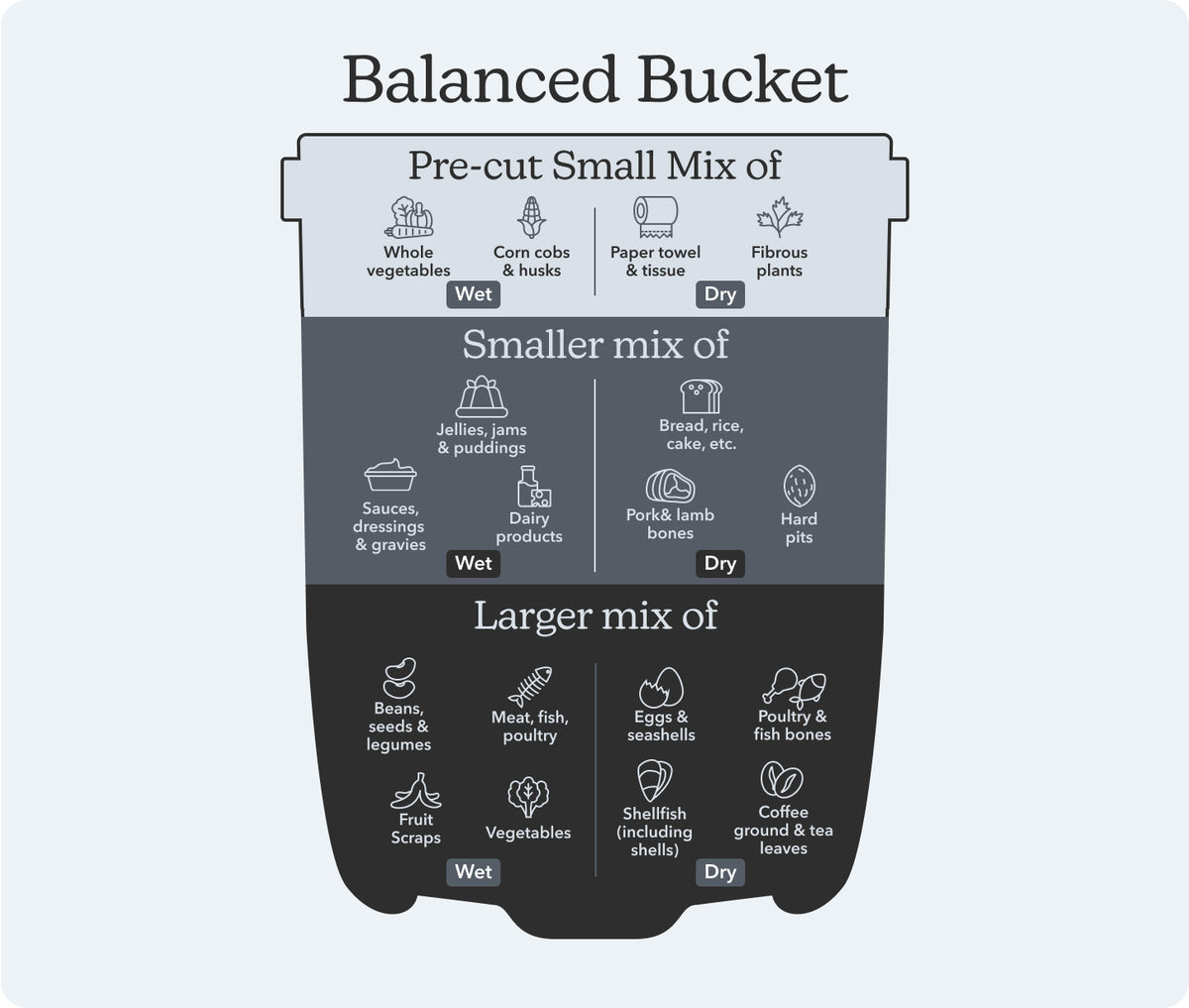
Suitable — add freely: veggie & fruit scraps; meat, fish & poultry; poultry & fish bones; coffee grounds & tea leaves (including filters and bags); beans, seeds & legumes; eggs & seashells; shellfish (with shells).
In small amounts: sauces, dressings & gravies; dairy products; jellies, jams & puddings; starches (bread, rice, cake, etc.); pork & lamb bones; hard pits (peach, apricot, lychee & mango).
Cut up prior: paper towel & tissue; corn cobs & husks; whole vegetables; fibrous plants (celery, asparagus, parsley, etc.).
Not recommended: cardboard; oils & fats; candy & gum; most “compostable” plastics; beef bones.
Why is food sticking in my bucket?
This usually means your scraps are too wet. Balance your bucket with drier materials like veggie stems, eggshells, paper towel, or Foodilizer® from your last cycle to help things flow. Avoid starting a fresh cycle when the bucket is caked with wet residue — soak it in warm water first.
My bucket is squeaking during a cycle.
Squeaking usually happens when contents are too dense or wet, creating resistance on the mixing paddle. Mix in drier material to balance the load. If the sound continues:
- Pause and open the lid, let the unit cool for a few minutes.
- Remove the bucket and run a ¼ cycle empty to clear the blade.
- If the sound stops, clean the bucket thoroughly and rebalance loads going forward.
How do I clean the bucket?
- Empty any remaining Foodilizer® from the bucket into your garden, compost bin, or storage container.
- Fill the bucket with warm, soapy water and let it soak for 10–15 minutes.
- Wipe the interior with a soft brush or cloth — never your hands, the blades are sharp.
- For stubborn residue, fill with boiling water and a few tablespoons of baking soda, let it sit, then rinse.
- Dry thoroughly and run a ¼ cycle empty to clear the blade before your next load.
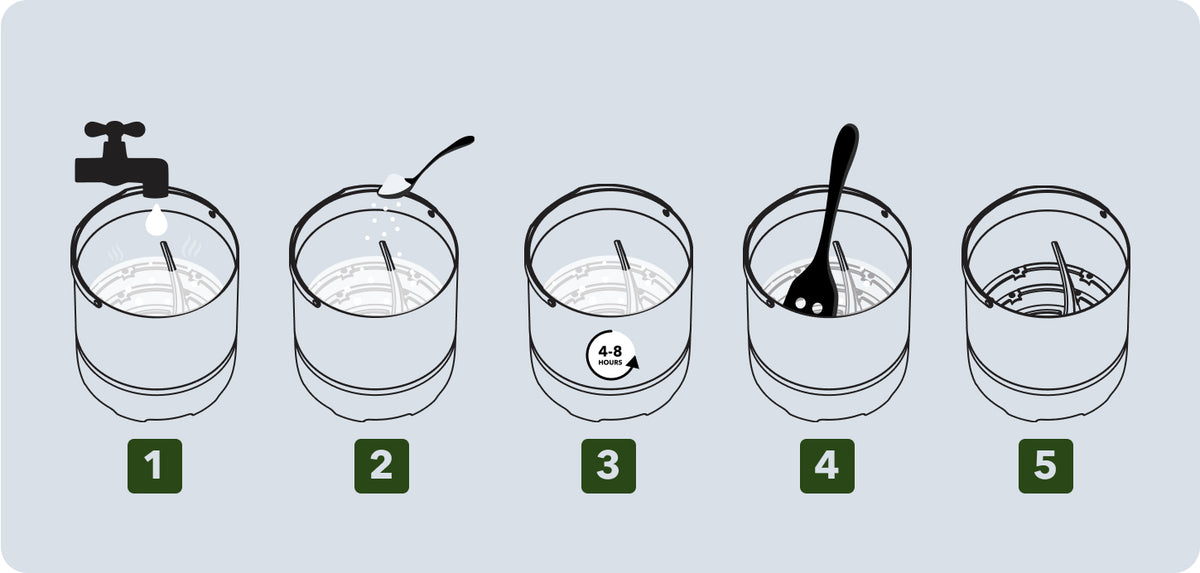
Never submerge the FoodCycler unit itself in water.
Troubleshooting by model
Error Lights & Alerts
Select your FoodCycler model to see the error codes and fixes that apply.
Eco 3™
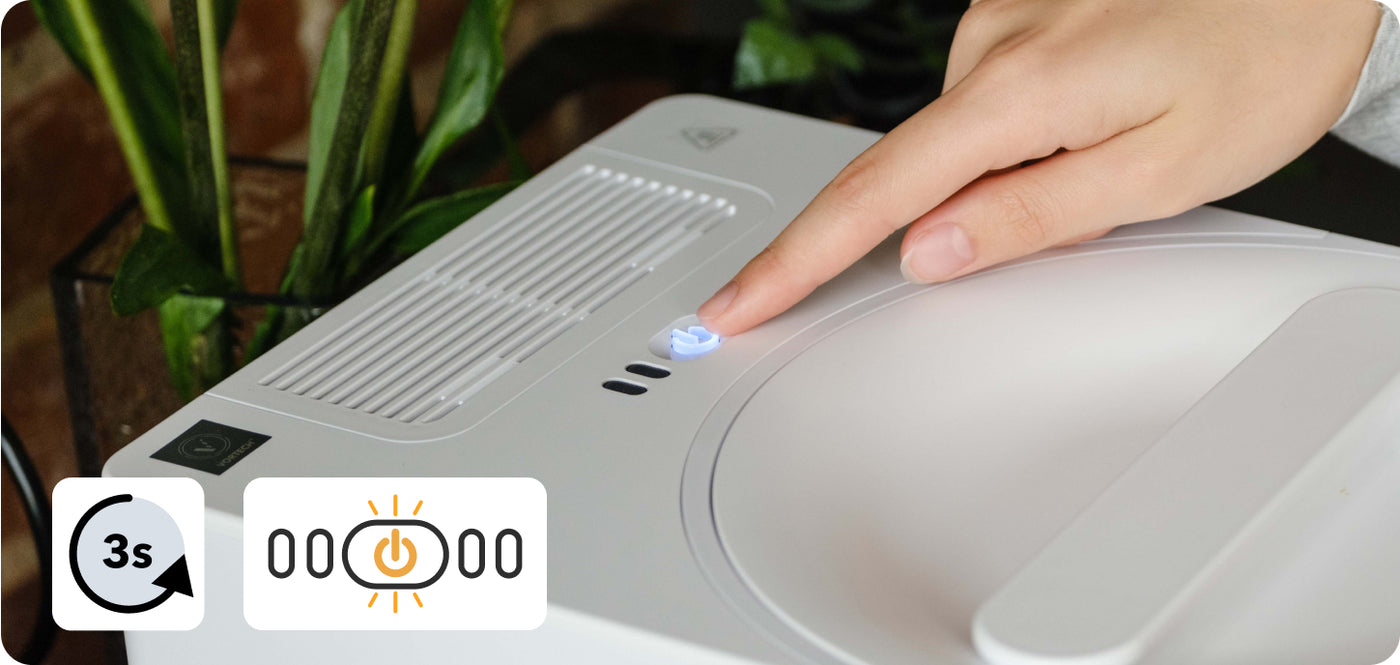
Filter Light is On:
- Press and hold the Power button for 3 seconds.
- Release, then press and hold again for 3 seconds until you hear a tone.
Lights Flashing:
Follow the same reset procedure as above.
General reset: unplug the unit, wait 2 minutes, make sure the bucket is empty and the lid is locked, then plug back in and press Start.
CAUTION: do not reach your hand into the bucket — the blades are extremely sharp.
Eco 5™
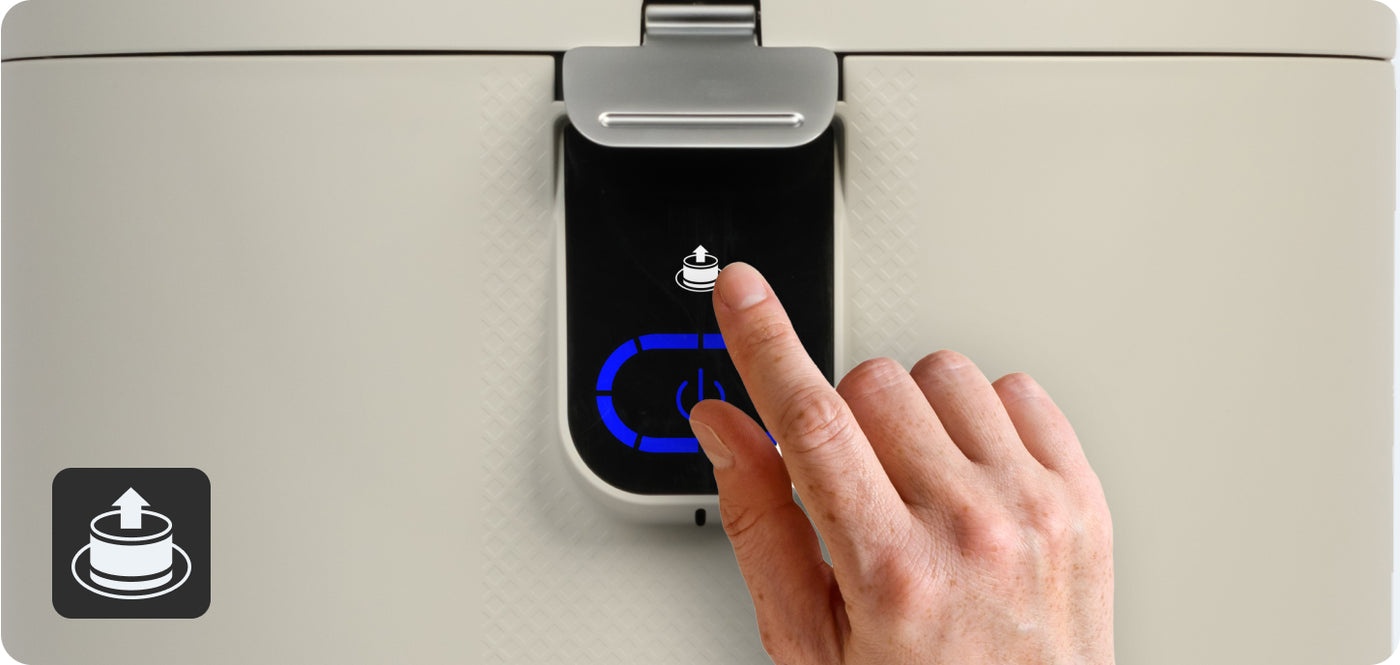
Filter Light is On:
Press and hold the white filter light button located above the power button.
Reset the Change Filter light:
After replacing the carbon pellets, press and hold Power for 3 seconds, release, then hold again for 3 seconds until you hear a tone.
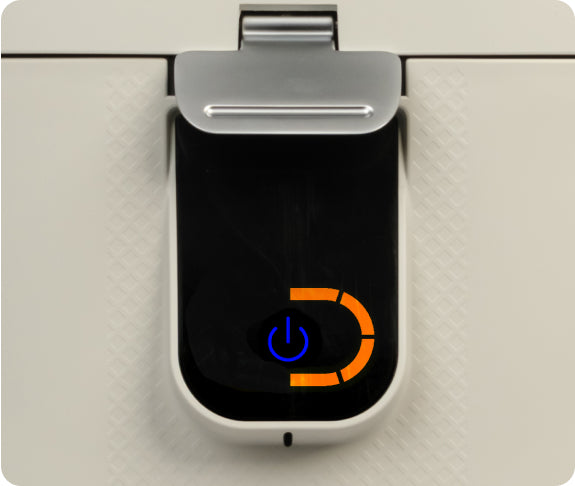
Abnormal Air Temperature:
The unit has detected abnormal external air temperature. The unit will not proceed until the warning indicator is cleared.
- Move the unit to a warmer or cooler room.
- Open and close the lid.
- Press the Power button once.
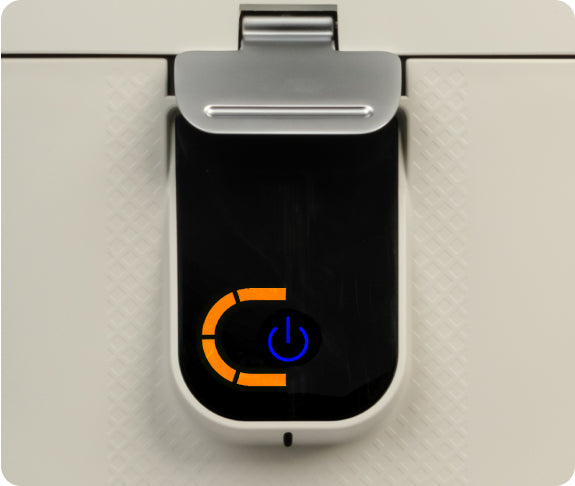
Motor Overload:
- Open the unit lid.
- Remove the Bucket from the unit.
- Carefully remove the obstruction from the bucket grinding teeth using the FoodCycler InfinityBrush™ or a long-handled spoon. Do not attempt to remove the obstruction while the bucket is still installed or engaged (gears turning). The grinding teeth are extremely sharp — handle with caution.
- Once the obstruction is removed, slide the bucket back into place.
- Close the lid.
- Press the Power button.
FC-30 / FC-50
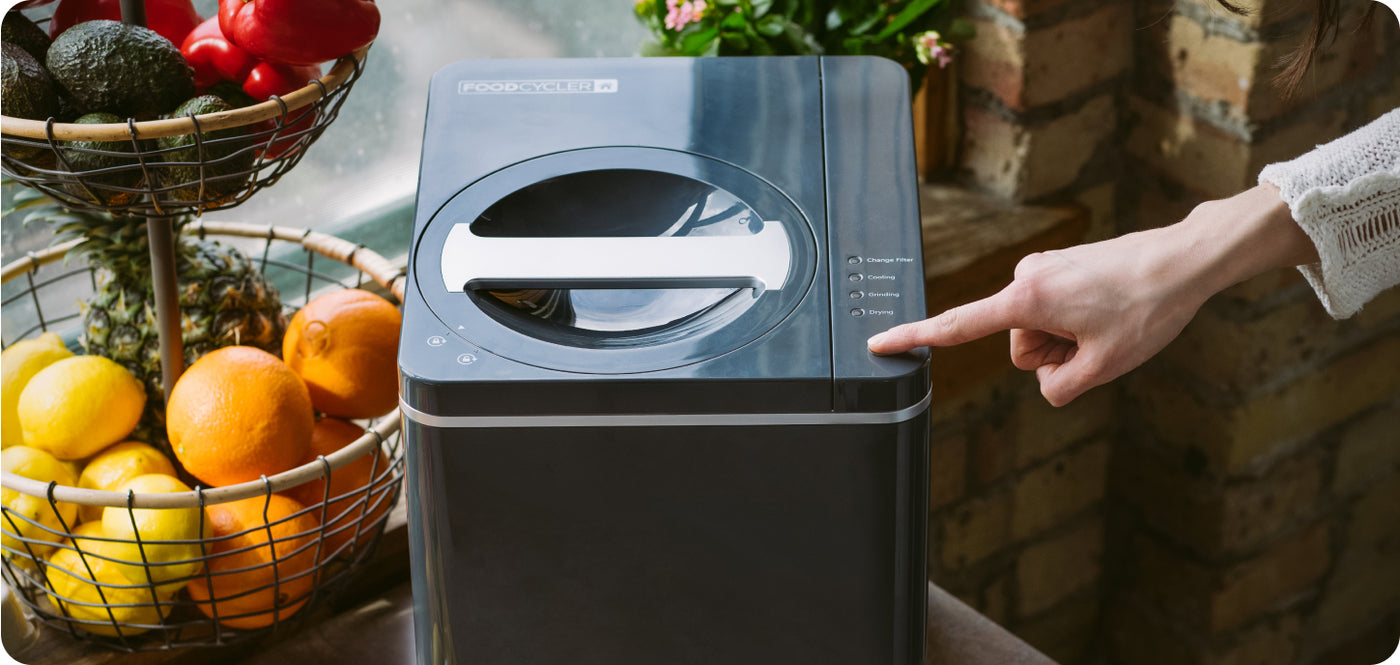
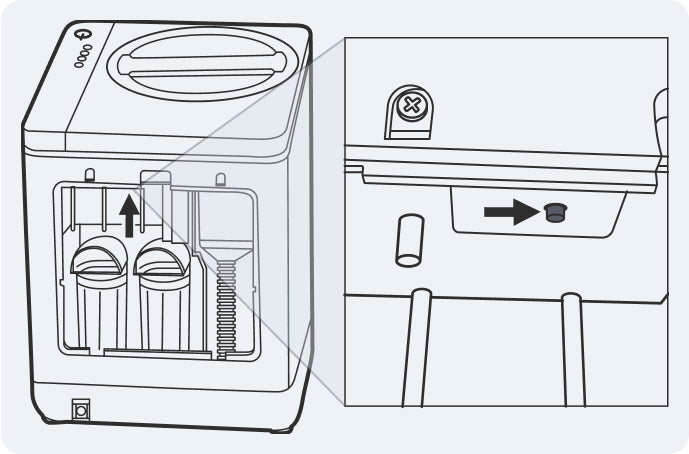
Filter Light is On:
- Remove the back panel.
- Feel along the upper inner ledge above “Reset Filter Light” for a round button.
- Press and hold for 3 seconds until a beep is heard.
Flashing Power Light:
This usually means the lid is not fully locked, or the cycle has been paused.
- Make sure the lid is closed and turned to the “locked” position.
- If the bucket is overfilled, remove some food waste so the lid can close properly.
- Press the Power button once to resume the cycle.
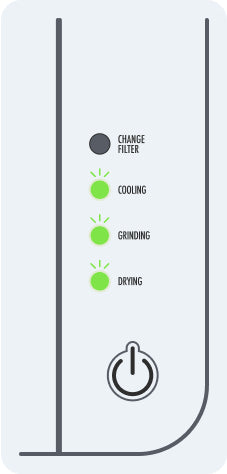
Flashing Drying Light:
This indicates the unit may be overloaded and has paused to prevent strain on the motor.
- Remove a portion of the contents.
- Make sure the grinding arm can rotate freely at the bottom of the bucket.
- Restart the cycle.
Constant Beeping:
This may be a sign the unit needs to be reset. Start with a quick reset:
- Unplug the unit and remove the bucket.
- Lock the lid closed and plug it back in.
- Tap the Power button to restart the cycle.
If the beeping continues, try a manual reset:
- With the lid locked and the bucket empty, hold the Start button for 3 seconds until you hear 3 beeps.
- Unplug the unit, wait 2 minutes, plug it back in, and press Start again.
Filter Light is On:
- Press and hold the Power button for 3 seconds.
- Release, then press and hold again for 3 seconds until you hear a tone.
Lights Flashing:
Follow the same reset procedure as above.
General reset: unplug the unit, wait 2 minutes, make sure the bucket is empty and the lid is locked, then plug back in and press Start.
CAUTION: do not reach your hand into the bucket — the blades are extremely sharp.
Filter Light is On:
Press and hold the white filter light button located above the power button.
Reset the Change Filter light:
After replacing the carbon pellets, press and hold Power for 3 seconds, release, then hold again for 3 seconds until you hear a tone.
Abnormal Air Temperature:
The unit has detected abnormal external air temperature. The unit will not proceed until the warning indicator is cleared.
- Move the unit to a warmer or cooler room.
- Open and close the lid.
- Press the Power button once.
Motor Overload:
- Open the unit lid.
- Remove the Bucket from the unit.
- Carefully remove the obstruction from the bucket grinding teeth using the FoodCycler InfinityBrush™ or a long-handled spoon. Do not attempt to remove the obstruction while the bucket is still installed or engaged (gears turning). The grinding teeth are extremely sharp — handle with caution.
- Once the obstruction is removed, slide the bucket back into place.
- Close the lid.
- Press the Power button.
Filter Light is On:
- Remove the back panel.
- Feel along the upper inner ledge above “Reset Filter Light” for a round button.
- Press and hold for 3 seconds until a beep is heard.
Flashing Power Light:
This usually means the lid is not fully locked, or the cycle has been paused.
- Make sure the lid is closed and turned to the “locked” position.
- If the bucket is overfilled, remove some food waste so the lid can close properly.
- Press the Power button once to resume the cycle.
Flashing Drying Light:
This indicates the unit may be overloaded and has paused to prevent strain on the motor.
- Remove a portion of the contents.
- Make sure the grinding arm can rotate freely at the bottom of the bucket.
- Restart the cycle.
Constant Beeping:
This may be a sign the unit needs to be reset. Start with a quick reset:
- Unplug the unit and remove the bucket.
- Lock the lid closed and plug it back in.
- Tap the Power button to restart the cycle.
If the beeping continues, try a manual reset:
- With the lid locked and the bucket empty, hold the Start button for 3 seconds until you hear 3 beeps.
- Unplug the unit, wait 2 minutes, plug it back in, and press Start again.
Cleaning & Filter Care
Routine care keeps your FoodCycler running like new and odour-free.
When should I replace my carbon filter?
Carbon filters last between 3–4 months with regular use, or 500 cycle hours. Life expectancy is determined by the moisture content and natural odours of the food waste — denser, wetter, and smellier scraps burn through filters faster than simple veggie scraps and eggshells.
If you're detecting strong odours coming from the unit even with the Change Filter light off, it's time for a fresh filter.
How do I reset my Change Filter light?
After replacing the carbon pellets, press and hold the Power button for 3 seconds, release, then hold again for another 3 seconds until you hear an audible tone. This resets the Carbon Filter Replacement reminder.
How do I clean my Eco 5™ filter mesh and grate?
- Remove the metal grate and filter mesh.
- Rinse and clean thoroughly, retaining the centre rubber gasket (grommet).
- Ensure both components are dry before reinserting.
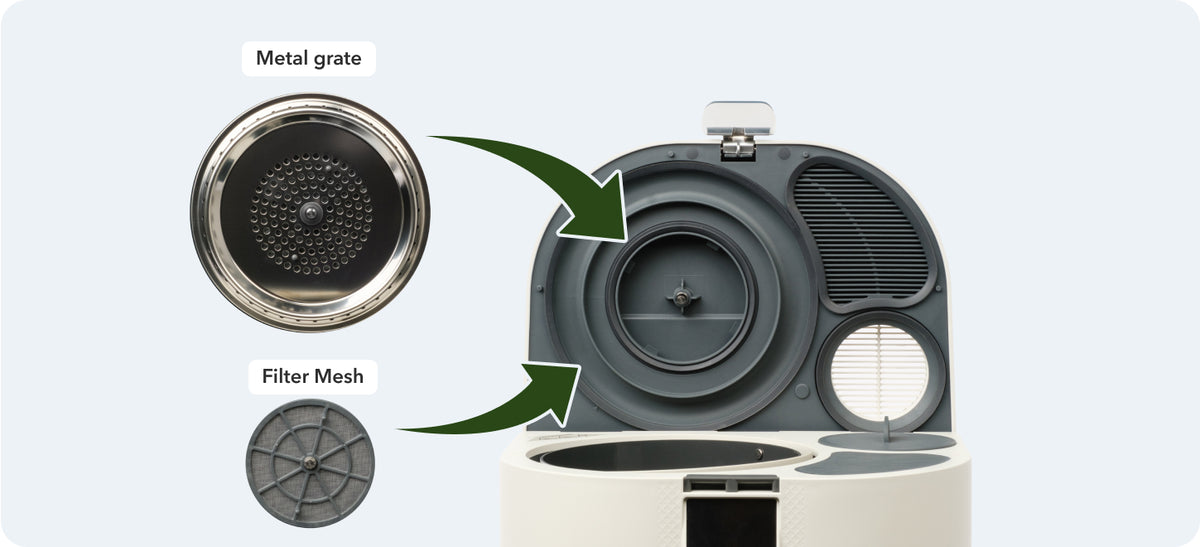
Make sure not to misplace the grommet attached to the metal grate when removing it for cleaning.
How do I give my FoodCycler a full refresh?
- Clean vents and the filter area by wiping with a clean cloth.
- Run a cycle with citrus rinds, 2 tbsp baking soda, and some dry Foodilizer® — this naturally clears odours and residue.
- Wipe the outside of the bucket with a clean cloth or sponge dampened with warm, soapy water (wring out any excess), then dry thoroughly.
- Replace the carbon filter pellets and reset the Change Filter light.
- Run an empty ¼ cycle to confirm smooth operation.
My bucket smells or looks dirty. How do I deep-clean it?
Follow the boiling water and baking soda method from the “How do I clean the bucket?” steps in the Using Your Bucket section above. Then run a ¼ cycle to make sure the blade is clear.
CAUTION: do not reach your hands into the bucket — the blades are extremely sharp.
Still need a hand?
Need more help?
If your question isn't listed, or the issue continues, our team is here to help. Fill in the form and a member of support will get back to you — usually within 24 hours.
Prefer another channel?
Email support@foodcycler.com
Call 1 855 367 6692 (Mon–Fri, 8am – 8:30pm ET)